

Field / referee
Run the game.
Operate the clock, score, counters, and play log from a fast field console.
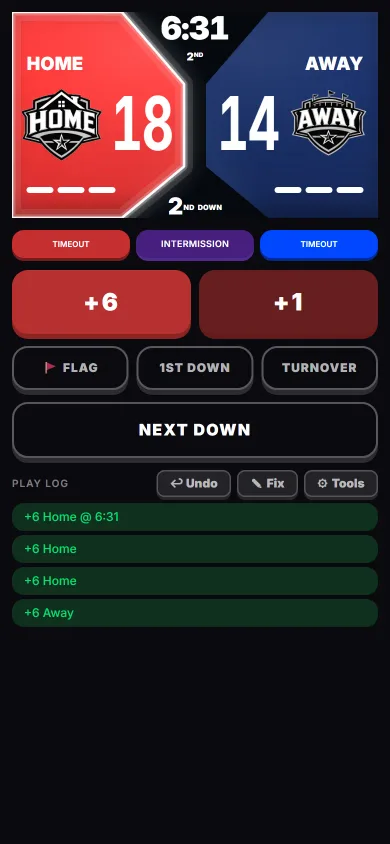
Open the AppReadyRef puts the clock, score, downs, timeouts, possession, flags, and undo on one field-ready screen, and every call you make reaches the fans’ phones live. No stacked menus. No hunting for the next action while the offense is lining up.

The layout follows the rhythm of a possession: the most urgent state stays largest, the next call stays close, and every correction remains recoverable.
On-screen calls can be mapped to physical buttons — the phone’s own volume keys, or a Bluetooth remote clipped to your lanyard. Start the clock, log the next down, or drop a flag without taking your eyes off the play.
Mappings live in Profile → Controls and can be changed between games. Bluetooth remotes also work in the browser app; volume buttons and screen-off presses need the Android app on Google Play.
The buttons already in your hand
Volume up and volume down each take an assignment of their own — next down and clock start/stop out of the box. Nothing to buy and nothing to pair.
Any Bluetooth remote
Pair a clicker, ring remote, or camera shutter, tap Map Button, and press it. ReadyRef catches whatever the remote sends — media keys, arrow keys, even swipe-style signals — then asks what that button should do. Map as many as the remote has.
Screen off, game still running
Remote presses keep reaching the game with the phone dark in your pocket, and a haptic buzz confirms each one landed without a second look.
No remote? Swipe instead.
Turn on Swipe controls and the ref screen becomes one big pad. Drag the knob left, right, up, or down to make the call you’ve assigned to that direction, and tap it to start or stop the clock — no aiming at small buttons.
One tap from the ref, and every screen in the park is already caught up. Families open the game’s six-character code in any browser, with no app or account, and get the live score, clock, down, possession, and play-by-play, plus reactions and predictions. When the game ends, a shareable recap page keeps the final score and scoring summary.
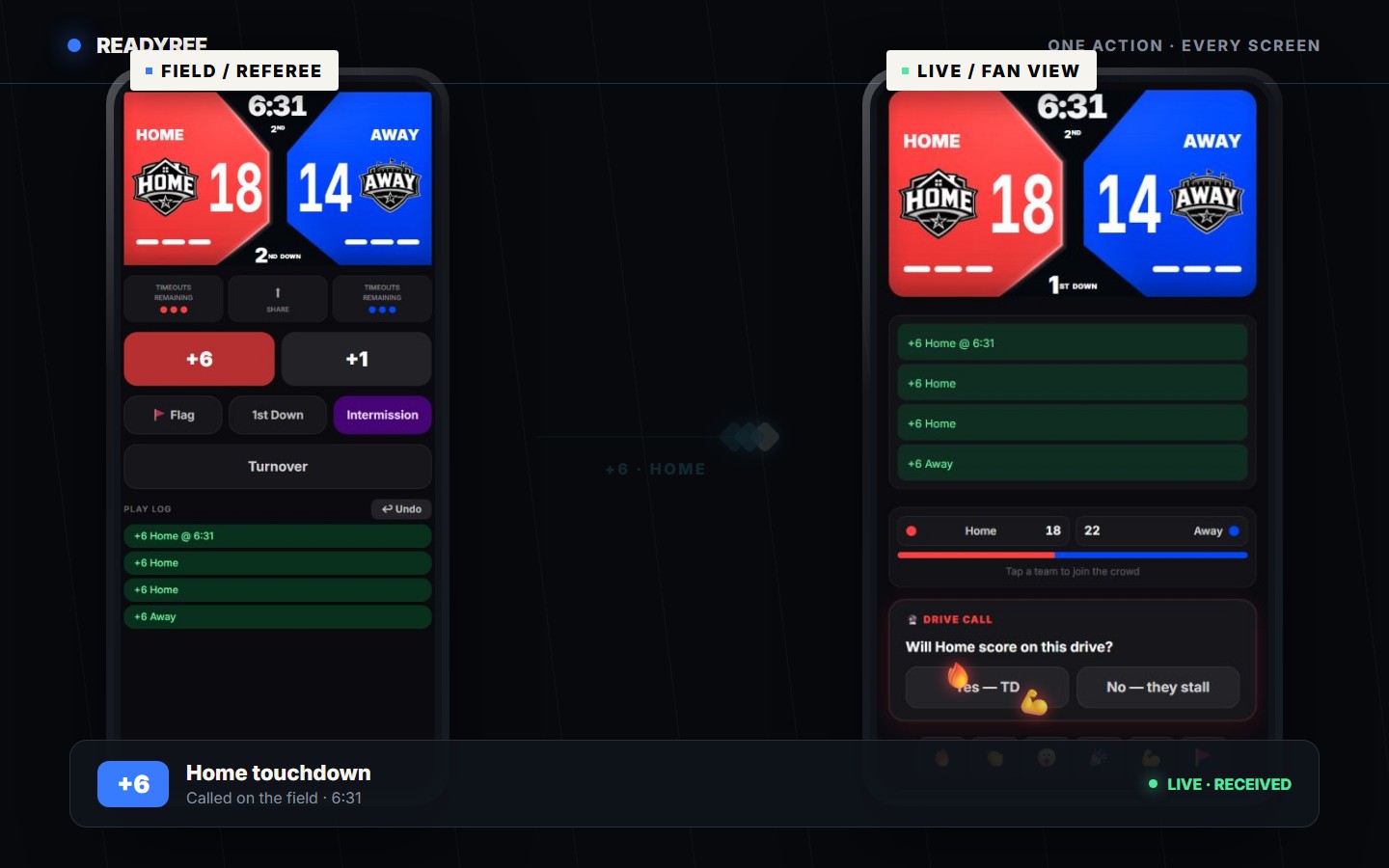
A referee taps plus six for Home. The referee score updates to 18-14, then the same score and play log reach the fan view, where fans answer a prediction and react.
A coach wants to know if the quarterback can run. The organizer uploads the league’s own rulebook once, and any referee in the league can ask it from the game menu. The answer quotes the exact rule text it came from, so you can show the coach the rule instead of arguing about it. If the rulebook doesn’t cover the question, ReadyRef says so instead of guessing.
Answers come only from the rulebook your league uploads (PDF or text), not from a generic rule set. Available when the league owner is on Plus or League.
Coin toss
Flip a virtual coin at kickoff, record who starts with the ball, and ReadyRef switches possession for you at halftime.
Sideline timer
Start a countdown for a player sitting out. It runs on the game clock, so it pauses whenever the clock stops, and only the refs see it.
A crew on one game
Up to five referees can run the same game from their own phones, and every call syncs between them and to the fans.
ReadyRef changes shape around the job without splitting the game into disconnected tools.
Field / referee
Operate the clock, score, counters, and play log from a fast field console.
Open the App

Stands / fan
Watch free by game code, pick a side, predict the next play, react, build streaks, and earn Fan Credits.
Watch a game
Sideline / organizer
Turn live results into schedules, standings, assignments, league sites, and season records.
League operationsEvery scheduled game on Plus and League rolls into League Pulse — a season-long stats view built from the calls the referee already made. Nobody exports a spreadsheet, and nobody tallies anything by hand.
Season superlatives are awarded straight from the scorelines — no stat-keeping required.
Team leaderboards
Points per game, point differential, scoring efficiency, and fewest points allowed — ranked across the season from the scores your referees post.
Player leaderboards
Six boards: touchdowns, yardage, conversions, flag pulls, interceptions, and sacks. A dedicated statistician works the sideline and credits every play to a player in real time, so the boards build as the game goes.
Season shape
Total points, touchdowns, first downs, and games played, plus league-wide scoring by down and a week-over-week trend line.
New to officiating? Start with how to referee flag football and the penalties and signals guide. Running a league? Take registrations and collect fees online, and registrants go straight onto your rosters.